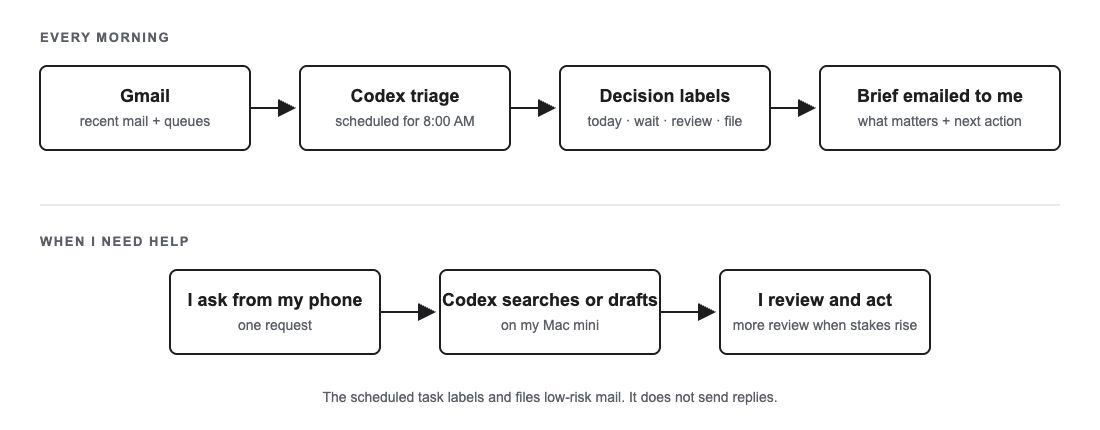
At 8:00 each morning, I get a brief email from myself that Codex creates. I read it to determine what emails I need to read. Then I often use Codex remotely to draft emails and reply.
I have Codex running on a Mac mini at my house 24/7. I remote in through the ChatGPT app on my phone. When I have an email I need to reply to, I tell Codex to reply and give it some context about what I want to say. It drafts the email, I review it, and then it sends it for me.
It saves time, but it also gives me organization and structure.
Why I needed this
I would struggle to see important messages soon after they came in. I would then have to search for them. When I found them, I would star them or mark them important. I would not remove the marker after I did not need it.
The messages I worried about were usually financial or personal. There were too many junk or promotional emails around them, along with receipts, newsletters, and Amazon updates.
Eventually Starred and Important were both cluttered. I had made two more places that I had to search.
Where I got the idea
I first saw Dan Shipper's short video about getting to inbox zero with Codex. I later watched the longer Every conversation with Austin Tedesco.
This got me thinking about ways I could improve my daily email triage. However, inbox zero was not really what I needed. This is personal email, not my work inbox, so I cared more about finding what was important.
What I set up
There are four pieces: Codex's Gmail connection, an Email Triage folder on my Mac mini, Gmail labels, and a scheduled task that runs at 8:00.
The scheduled request is short:
Every day at 8:00 AM
Scan recent inbox mail and existing decision queues
Maintain the approved labels and safely file low-risk clutter
Write a dated report and email the same brief to me
The instructions in the folder have the actual rules. They describe what I consider urgent, what can be filed, what needs to stay visible, and what should show up in the brief.
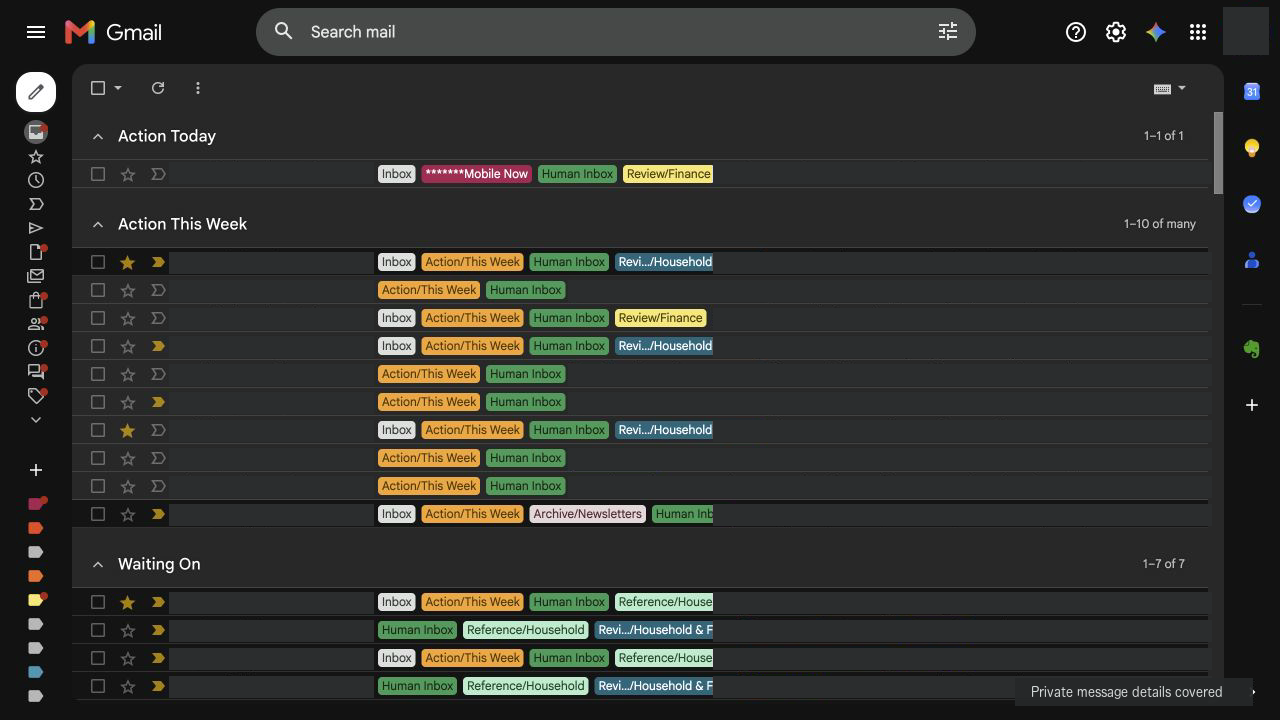
We came up with the folder structure by iterating back and forth. One early run put 38 messages in my phone queue and 28 in Action Today. That was too much. A recent run had eight in the phone queue and one in Action Today.
The labels are based on the decision I need to make. Do I need to act today? Can it wait until this week? Am I waiting on somebody else? Do I need to review it, keep it as a reference, or archive it?
Those decisions became Action Today, Action This Week, Waiting On, Review, Reference, and Archive. Human Inbox is a wider reading list. Mobile Now is a small phone queue with Action Today, recent alerts, urgent direct requests, and a few waiting items.
This is what I have settled on now, but it may change. Weekly and review items can still pile up, and old messages sometimes stay in a queue after I am finished with them.
What the scheduled task can do
The recurring job can apply labels and archive clear, low-risk clutter. It cannot send replies, delete messages, mark them read, unsubscribe, or follow account links. Financial, security, medical, legal, family, and real-person messages stay visible.
When I am there, I may ask Codex to send a particular reply or delete a bad draft. I can see the result and follow up if needed.
I still have some fear that I will let a nonsensical Codex reply go out. I do not have much evidence to support that thought because the drafts have generally been good. It is still a thought, so I usually review them. A scheduling response is different from an email involving money or personal information.
The human judgment part is close to what Dan describes in “After Automation”.
What this looks like over a few days
One recent support issue involved a household device with a cloudy screen. I sent short requests from my phone as the situation changed. These are lightly edited for privacy and length:
Me: Did [the company contact] respond about the clouding on the screen?
Codex: No—[the company contact] had not responded. The thread still contained only my original message about the cloudy screen and bag program.
Me: Can you send a kind follow-up?
Codex: Sent a kind follow-up in the existing thread, covering both the cloudy screen and the complimentary bag program.
Me: Any response?
Codex: No response yet. The thread still contained only my original email and follow-up.
Me: Can you find another support email from the company and forward that thread with a follow-up?
Codex: Sent it to [company support] with the original message and screen photos, the unanswered follow-up, and requests for display troubleshooting and bag-program details.
Me: What's the latest here?
Codex: [The company contact] replied and looped in customer support. Support would follow up and might replace the unit. There was also an unsent draft with three repetitive versions of the same response, so I would not send it as-is.
Me: Okay, delete that draft. Also, what are the instructions for the annual bag pass?
Codex: The duplicate draft was deleted and moved to Gmail Trash. For the Annual Bag Pass, add up to 12 bags, check out with the email tied to the pass, and the bag cost should be removed automatically.
Me: Great, let me know when support replies on the cloudy screen.
Codex: I’ll monitor the thread and let you know when support sends a human response. I won’t modify or reply to the email.
Codex checked the thread and sent a follow-up. When there was still no response, it found another verified support address in an older email and forwarded the original context there. Later it found that support had been added and that a replacement might be possible.
During one of those checks, Codex noticed an unsent draft with three repetitive versions of the same reply. I had not asked it to find that. It pointed the draft out, I told it to delete it, and then it found the annual program instructions I needed.
The search may be even more useful
I love being able to search my email through Codex and get back organized messages. The search is more proactive than it is in an email client because I can describe the problem, not just a sender or keyword.
For example, I have been working on rolling over a 401(k) balance from my previous employer to my new employer account. The checks from the previous provider were made out incorrectly for the new account. I had a series of emails from both providers about the issue.
I knew I had an issue because I had skimmed the emails, but it spanned several weeks while I tried to get details. I needed Codex to find everything and organize it for me.
This was my whole request, lightly edited to remove the provider names:
Find emails about my 401(k) transfer from my old provider to my new provider failing and give me the steps needed to remedy it.
Codex found the original mailing, three follow-ups from May 30 through June 3, a June 9 reminder, and a June 20 correction deadline that had already passed. It did not find a later stop-payment confirmation, replacement-check notice, or receipt confirmation.
The answer contained details on how the checks should be made out, how to contact the old provider to get them updated, talking points for the phone call, reference material for opening a case if needed, and how to resubmit the rollover with the new provider because the earlier submission had expired.
It also put the calls in order: confirm the payee wording with the new provider, ask the old provider to stop and reissue the check with tracking, and give the tracking information to the new provider.
I checked the important details against the source emails before acting. Otherwise I would have spent more time on the phone and in two provider portals finding all of it.
It was all done from one request on my end. That saved me a lot of time.
A better place to start
We have changed the labels and rules several times, and I am sure we will change them again. I still make the decisions that matter. Codex gives me a better place to start.
I am writing another article about the Codex skill and process I use to write these posts.